English
 日本語
日本語 한국 사람
한국 사람 简体中文
简体中文 繁體中文
繁體中文 Deutsch
 بالعربية
 TÜRKÇE
 português
 คนไทย
คนไทยHow do I use the ReplayGain feature in PotPlayer?
PotPlayer version 261021 has added a ReplayGain feature.
When the music files we download contain some songs that are too loud and others that are too quiet, ReplayGain can unify the volume of music with different volume levels.
ReplayGain is stored in tags within audio files, indicating the gain value. Players that support ReplayGain can read these tags and adjust the internal volume during playback, keeping the actual volume of different songs at the same level without changing the system volume. Many dedicated music player applications support ReplayGain, such as Foobar/Navidrome.
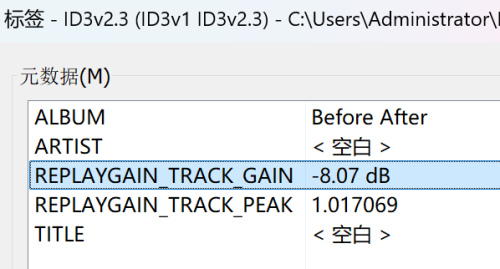
For example, when a music file is viewed with Mp3tag, its track gain is -8.07 dB and its track peak is 1.017069.
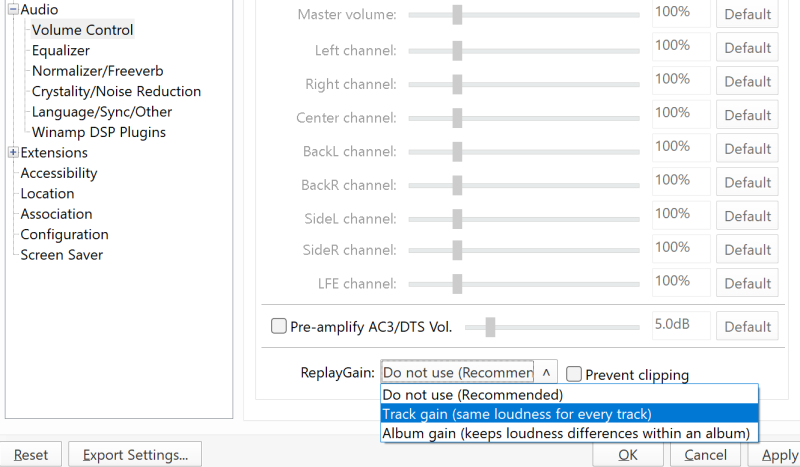
The newly added ReplayGain feature in PotPlayer is disabled by default. Open "Preferences - Audio - Volume Control" and select "Track Gain" for ReplayGain.