English
 日本語
日本語 한국 사람
한국 사람 简体中文
简体中文 繁體中文
繁體中文 Deutsch
 بالعربية
 TÜRKÇE
 português
 คนไทย
คนไทยPotPlayer Keyboard Shortcuts
2019-03-03 - 7,196
There are a lot of shortcuts in PotPlayer, by using shortcuts it can be convenient for us and make the operation more efficient and quicker.
| General | |
| F1 | About |
| F2 | Open folder |
| F3 | Open files |
| F5 | Preferences |
| F6 | Playlist |
| F7 | Control panel |
| F12 | Navigate files |
| Ctrl + F1 | Playback / System info |
| Alt + F4 | Exit |
| Ctrl + U | Open URL |
| Alt + F12 | Open FTP / WebDAV / HTTP... |
| Ctrl + V | Open file / URLs from clipboard |
| Ctrl + F12 | Navigate menus |
| Ctrl + S | Open screen capture |
| Ctrl + J | Open webcam / other device |
| Ctrl + W | Open analog TV |
| Ctrl + K | Open digital TV (BDA device) |
| Alt + D | Device settings... |
| Ctrl + D | Open DVD |
| Ctrl + Alt + D | Open Blu-ray |
| Alt + O | Load subtitle |
| Ctrl + Alt + Y | Reload subtitle |
| Ctrl + Y | Reopen current / Last item |
| Playback | |
| Space | Play / Pause playback |
| Page Up | Play previous item |
| Page Down | Play next item |
| H | Chapter / bookmark |
| P | Add bookmark |
| Shift + Page Up | Previous bookmark / Chapter |
| Shift + Page Down | Next bookmark / Chapter |
| D | Jump to previous frame |
| F | Jump to next frame |
| Shift + Ctrl + Left arrow | Previous keyframe |
| Shift + Ctrl + Right arrow | Next keyframe |
| Left arrow | 5 seconds backward |
| Right arrow | 5 seconds forward |
| Ctrl + Left arrow | 30 seconds backward |
| Ctrl + Right arrow | 30 seconds forward |
| Shift + Left arrow | 1 minutes backward |
| Shift + Right arrow | 1 minutes forward |
| Ctrl + Alt + Left arrow | 5 minutes backward |
| Ctrl + Alt + Right arrow | 5 minutes forward |
| Backspace | Starting point |
| Ctrl + Backspace | Middle point |
| Shift + Backspace | 30 seconds before ending |
| Home | Previous subtitle position |
| End | Next subtitle position |
| Ctrl + Home | Current subtitle position |
| G | Jump to specific time / frame... |
| Shift + Z | Browse scenes by time intervals... |
| Alt + Z | Browse scenes by marker positions... |
| Shift + \ | Enable skip feature |
| \ | Skip setup... |
| Z | Normal / Last used speed |
| X | Slower |
| C | Faster |
| Shift + Del | Send selected files to Recycle Bin |
| Ctrl + Shift + Del | Send selected and related files to Recycle Bin |
| [ | Set starting point |
| Shift + [ | Reset point A |
| Ctrl + [ | Move point A 0.1 second backward |
| Alt + [ | Move point A 0.1 second forward |
| ] | Set ending point (B) |
| Shift + ] | Reset point B |
| Ctrl + ] | Move point B 0.1 second backward |
| Alt + ] | Move point B 0.1 second forward |
| Ctrl + Alt + [ | Move A-B points 0.1 second backward |
| Ctrl + Alt + ] | Move A-B points 0.1 second forward |
| Ctrl + \ | Repeat 5 sec.behind current point |
| Insert | Auto repeat current subtitle section |
| Alt + \ | Auto repeat current marker section |
| \ | Start / Stop A-B section repeat |
| Shift + \ | A-B repeat setup... |
| Subtitles | |
| L | Add / select subtitles |
| Alt + O | Load subtitle... |
| Alt + L | Cycle subtitle |
| Alt + Ctrl + L | Cycle 2nd subtitle |
| Alt + H | Show / Hide subtitles |
| Alt + E | Browse / Edit / Sync subtitles... |
| Alt + P | Input subtitles... |
| Alt + I | Display on Video (TV-OUT) |
| Alt + I | Display on Overlay / VMR / EVR Surface |
| Alt + B | Use bold font |
| Alt + Page Up | Increase font size |
| Alt + Page Down | Decrease font size |
| Alt + F | Font settings... |
| Alt + Home | Default position |
| Alt + Up arrow | Move up |
| Alt + Down arrow | Move down |
| Alt + Left arrow | Move left |
| Alt + Right arrow | Move right |
| Alt + Num 6 | Increase horizontal spacing |
| Alt + Num 4 | Decrease horizontal spacing |
| Alt + Num 8 | Increase vertical spacing |
| Alt + Num 2 | Decrease vertical spacing |
| , | Decrease Subtitle Sync by 0.5 sec |
| Ctrl + , | Decrease Subtitle Sync by 5 sec |
| Alt + , | Decrease Subtitle Sync by 50 sec |
| . | Increase Subtitle Sync by 0.5 sec |
| Ctrl + . | Increase Subtitle Sync by 5 sec |
| Alt + . | Increase Subtitle Sync by 50 sec |
| / | Default Subtitle Sync |
| Alt + Ctrl + . | Reset next subtitle sync to current position |
| Ctrl + Alt + , | Reset previous subtitle sync to current position |
| Alt + S | Save SMI subtitle / Save subtitle as... |
| Ctrl + Shift + S | Save subtitle as video filename |
| Ctrl + Alt + S | Save subtitle as... |
| Video | |
| V | Select video stream |
| Alt + V | Cycle video stream |
| S | Pixel shader |
| Shift + P | Use pre-resize pixel shaders |
| Ctrl + Alt + P | Use post-resize pixel shaders |
| J | 3D video mode |
| Ctrl + X | Cycle built-in video transform filter usage |
| Ctrl + I | Cycle deinterlacing mode |
| Ctrl + Q | Extend / Crop video... |
| Ctrl + P | Flip vertical |
| Ctrl + Z | Flip horizontal |
| Ctrl + B | Soften |
| Ctrl + R | Sharpen |
| Ctrl + L | Level control |
| Ctrl + H | Deblock |
| Ctrl + N | Denoise 3D |
| Ctrl + M | Temporary denoise |
| Q | Disable / Last used color controls |
| W | Decrease brightness by 1% |
| E | Increase brightness by 1% |
| R | Decrease contrast by 1% |
| T | Increase contrast by 1% |
| Y | Decrease saturation by 1% |
| U | Increase saturation by 1% |
| I | Decrease hue by 1% |
| O | Increase hue by 1% |
| Alt + K | Cycle screen rotation |
| K | Capture video |
| Alt + N | Create thumbnail image... |
| Ctrl + G | Creative consecutive image capturing |
| Ctrl + C | Copy current source frame to clipboard |
| Ctrl + E | Save current source frame |
| Ctrl + Alt + C | Copy current screen frame to clipboard |
| Ctrl + Alt + E | Save current screen frame |
| Ctrl + A | Record stream... |
| Ctrl + Shift + A | Start / stop stream recording |
| Alt + C | Record video... |
| Audio | |
| Up arrow / Mouse wheel up | Increase volume |
| Down arrow /Mouse wheel down | Decrease volume |
| M | Mute |
| Shift + Up arrow | Increase master volume |
| Shift + Down arrow | Decrease master volume |
| A | Select audio stream |
| Alt + A | Cycle audio stream |
| Shift + E | Use equalizer |
| Shift + X | Use built-in audio transform filter |
| Ctrl + Alt + Shift + Up arrow | Increase master volume |
| Ctrl + Alt + Shift + Down arrow | Decrease master volume |
| Ctrl + Shift + Alt + M | Mute (master) |
| Ctrl + Alt + Up arrow | Increase wave volume |
| Ctrl + Alt + Down arrow | Decrease wave volume |
| Ctrl + Alt + M | Mute (wave) |
| Shift + , | Slower |
| Shift + . | Faster |
| Shift + \ | Default audio sync |
| Shift + N | Normalizer |
| Shift + C | Crystality |
| Shift + D | Noise reduction |
| Shift + R | Freeverb |
| Shift + V | Voice removal |
| Shift + A | Voice emphasis |
| Shift + T | Swap stereo channels |
| Shift + G | Record audio... |
| Shift + H | Slower |
| Shift + J | Faster |
| Shift + K | Normal |
| Broadcast | |
| F8 | Broadcast window |
| F9 | Chat window |
| F10 | Manage broadcast |
| F11 | Start / Stop broadcasting |
| Ctrl + Alt + F1 | Show / Hide Capture1 area |
| Ctrl + Alt + F2 | Show / Hide Capture2 area |
| Ctrl + Alt + F3 | PIP primary screen: Capture1 Area |
| Ctrl + Alt + F4 | PIP primary screen: Capture2 Area |
| Ctrl + Alt + F5 | Screen capture settings |
| Ctrl + Alt + F6 | Start / Stop broadcast recording |
| Ctrl + A | Record stream |
| Album / Favorites | |
| Alt + Insert | Add current item to favorites |
| Ctrl + Insert | Add current folder to favorites |
| F4 | Close playback |
| TV (WDM/BDA) | |
| Home | First channel |
| Page Down | Previous channel |
| Page Up | Next channel |
| End | Last channel |
| Insert | Recall channel |
| Ctrl + Page Down | Force previous channel |
| Ctrl + Page Up | Force next channel |
| Del | Enter a channel... |
| N | Channel control |
| Alt + G | Channel management |
| Ctrl + A | Record stream... |
| Ctrl + Shift + A | Start / stop stream recording |
| DVD control | |
| Page Up | Previous chapter |
| Page Down | Next chapter |
| Alt + Backspace | Title menu |
| Filters | |
| Ctrl + F | Manage filters... |
| Misc | |
| Tab | Display Full Playback/Audio Tag Info / OSD |
| Scroll Lock | Display Misc Info |
| Shift + Tab | Show Short Playback Info |
| Shift + L | Interface language |
| Ctrl + T | Cycle stay on top |
| Ctrl + Alt + A | Cycle playback finished action |
| Frame size | |
| Num 0 | Cycle frame size presets |
| Num 5 | Actual / Last used size |
| Num 9 | Zoom in |
| Num 1 | Zoom out |
| Num 6 | Stretch horizontally |
| Num 8 | Stretch vertically |
| Num 4 | Compress horizontally |
| Num 2 | Compress vertically |
| Ctrl + Num 6 | Move right |
| Ctrl + Num 4 | Move left |
| Ctrl + Num 8 | Move up |
| Ctrl + Num 2 | Move down |
| Ctrl + Num 5 | Actual position |
| Aspect ratio | |
| Ctrl + F5 | Cycle aspect ratio mode |
| Ctrl + F6 | Cycle aspect ratio |
| Window size | |
| ` | Minimum size |
| 1 | 0.5x video output size |
| 2 | 1.0x video output size |
| 3 | 1.5x video output size |
| 4 | 2.0x video output size |
| Alt + 1 | 30% of desktop size |
| Alt + 2 | 45% of desktop size |
| Alt + 3 | 60% of desktop size |
| Alt + 4 | 75% of desktop size |
| 5 | Maximum size |
| 6 | Maximize (to Desktop) / Restore |
| 7 | Maximize to screen / Restore |
| 8 | Fit to video aspect ratio |
| 9 | Custom size |
| 0 | Set custom window size... |
| Enter / Alt + Enter | Fullscreen (keep aspect ratio) |
| Ctrl + Enter | Fullscreen (stretch) |
| Ctrl + Alt + Enter | Fullscreen (stretch by keeping AR) |
| Ctrl + Shift + Enter | Fullscreen (on another display) |
| Ctrl + Alt + Num + | Increase window size |
| Alt + Ctrl + Num - | Decrease window size |
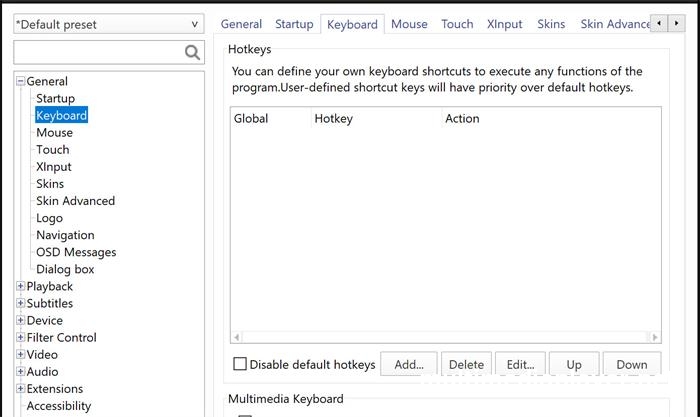
How to customize shortcuts in PotPlayer?
Mouse Right-click on PotPlayer,“Preferences - General - Keyboard - Add”.