 English
 日本語
日本語 한국 사람
한국 사람 简体中文
简体中文 繁體中文
繁體中文 Deutsch
 بالعربية
 TÜRKÇE
 português
 คนไทย
คนไทยHow to loop a section of a video with PotPlayer?
2024-11-05 - 5,136
If you want to loop sections of videos ,you can use PotPlayer's A-B Repeat function.This is useful when you want to learn some kind of skills (such as languages,music, etc.) by watching a specific part over and over.
Right mouse click on PotPlayer,“Playback - A-B Repeat”.
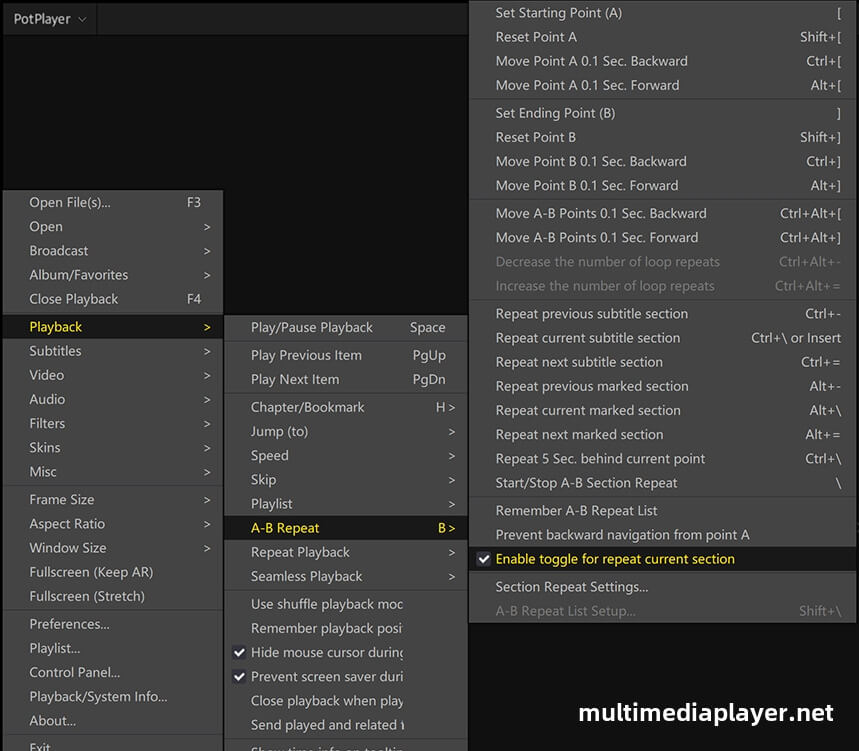
you can set AB loop in any point of the video,play a video,use the markers to select the start and end time of the loop.
Press '[' at a certain point as the start time and Press ']' at another point to mark it as the end time.
Then PotPlayer playing the video loop from point A to point B continuously.
Keyboard Shortcuts:
| [ | Set starting point |
| Shift + [ | Reset point A |
| Ctrl + [ | Move point A 0.1 second backward |
| Alt + [ | Move point A 0.1 second forward |
| ] | Set ending point (B) |
| Shift + ] | Reset point B |
| Ctrl + ] | Move point B 0.1 second backward |
| Alt + ] | Move point B 0.1 second forward |
| Ctrl + Alt + [ | Move A-B points 0.1 second backward |
| Ctrl + Alt + ] | Move A-B points 0.1 second forward |
| Ctrl + \ | Repeat 5 sec.behind current point |
| Insert | Auto repeat current subtitle section |
| Alt + \ | Auto repeat current marker section |
| \ | Start / Stop A-B section repeat |
| Shift + \ | A-B repeat setup... |